SafeQod

El código QR  de confianza

No podías confiar en los códigos QR para el seguimiento operacional. Hasta ahora.

Feedback del cliente

Gestión de tareas

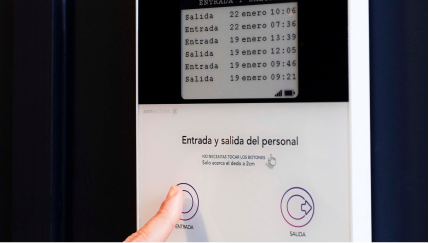
Fichajes

White square device with a QR code and the word 'Taqt' printed below it on a gray background.

Las reglas no siempre se respetan

Sobre todo en operaciones.
Un código QR estándar se puede copiar y manipular fácilmente, lo que compromete la trazabilidad. SafeQod genera un código QR que se actualiza en intervalos regulares.

Código QR rotativo

Un código QR estándar representa un riesgo para tu sistema de información. SafeQod bloquea los intentos de fraude.

Respeta la privacidad

El seguimiento GPS puede ser invasivo y fácil de manipular. SafeQod es la alternativa más segura e inteligente para el control de asistencia.

Integración sencilla y rápida

Funciona como un código QR estándar, sin necesidad de instalar una app. Conéctalo fácilmente con Power Automate, Zapier o cualquier app desde la plataforma Ubiqod.

Pattern of alternating squares and curved quarter circles in gradient shades from red to blue on a black background.Pattern of alternating squares and curved quarter circles in gradient shades from red to blue on a black background.
White square smart light switch with a central square button and the brand name Taqt below it.
Square QR code centered on a white background.
Black and white QR code centered on a light gray square background.
Rounded black square centered on a white background.
Graphic titled 'Expanded Utility' showing a layered diagram with 'Utility 1' and 'Utility 2' boxes above a central Ubiqod icon and text explaining lookalike audiences and data pooling benefits in advertising.

Funciona con cualquier smartphone

El sistema valida el QR en cada escaneo. ¿Un código caducado? Se detecta y se reporta al instante.

Códigos QR estándar vs
Códigos QR seguros

Características

Estándar
QR Code

Seguro
QR Code

Protegido contra la copia
Fiable para el seguimiento operacional
Respeta la privacidad del usuario
Se integra a la plataforma Ubiqod

Tu dispositivo, a tu manera.
En la plataforma Ubiqod

SafeQod se adapta a cada caso: registra asistencias, gestiona tareas, recoge feedback o reporta incidentes, todo desde una misma plataforma.

Dashboard screen showing interface to track on-site attendance with a mobile preview asking 'Are you arriving or leaving?' and buttons labeled In, Out, and Your Choice along with editable answer choices.
Black background with a repeating pattern of white squares and quarter-circle arcs arranged in a grid.

TaqtOne & Ubiqod Key:
can’t decide?

Features
TaqtOne
(Choose Your Solution)
Ubiqod Key
(Build Your Solution)
Screen Display
Last cleanings
Single-use, rolling QR code
Interaction Method
Touchless buttons
User’s smartphone
Check-in method
NFC tags (provided)
User’s smartphone
Customization
One device per use case
One device, multiple use cases, managed online
Use case flexibility
Requires a new front panel for different use cases
Change the QR code function anytime via platform
Connectivity
No WiFi or cables needed, needs a GSM network
No WiFi or cables needed
Power Source
Battery-powered
Battery-powered
Data Collection
Sent to online platform