Maintenance Request System: Capture Requests On Site and Send Them to Your CMMS
A maintenance request is how someone reports a need or a fault to the team in charge of fixing it: an empty dispenser, a leak, a broken light, a dirty restroom. A maintenance request system covers the whole journey, from the report to closure, through assignment and the work itself.
CMMS software handles the middle of that journey well: assigning, scheduling, tracking. The weak link is often the first step. If the person who spots the problem has to work out who to tell, then describe the exact location (“the second-floor restrooms, by the elevator”), they will report it badly, or not at all. The other weak link is the last step: nothing proves the work actually happened on site.
Here is how to capture the request at the source, then how to close the loop.
Maintenance request, work order, service report: who does what?
- The maintenance request (or work order request) is the report: what, where, when, and sometimes who.
- The work order is the decision to act. It is created in the CMMS and assigned to a technician or a crew.
- The service report comes afterwards: what was done, time spent, parts used.
A good request saves time at every later step. A vague one (“something’s leaking on the second floor”) means calling back, searching, or a wasted trip.
Where maintenance requests break down
An occupant notices a problem. They don’t always know who to tell: the front desk, a phone number, an email address, the cleaner in the hallway. Every channel loses part of the information. The location stays vague, the time unknown, and the same fault gets reported three times by three different people.
Field staff see plenty during their rounds. Without a simple way to report it on the spot, they make a note for later, or forget.
Managers often find out through a complaint. They don’t know whether yesterday’s request was handled either, or by whom.
So the quality of a maintenance request depends on two things: how easy it is to submit on site, and how reliable its context is: the right place, the right time and, when needed, the right person.
Three sources of requests, three ways to capture them
Occupants and visitors: a QR code or a device on site
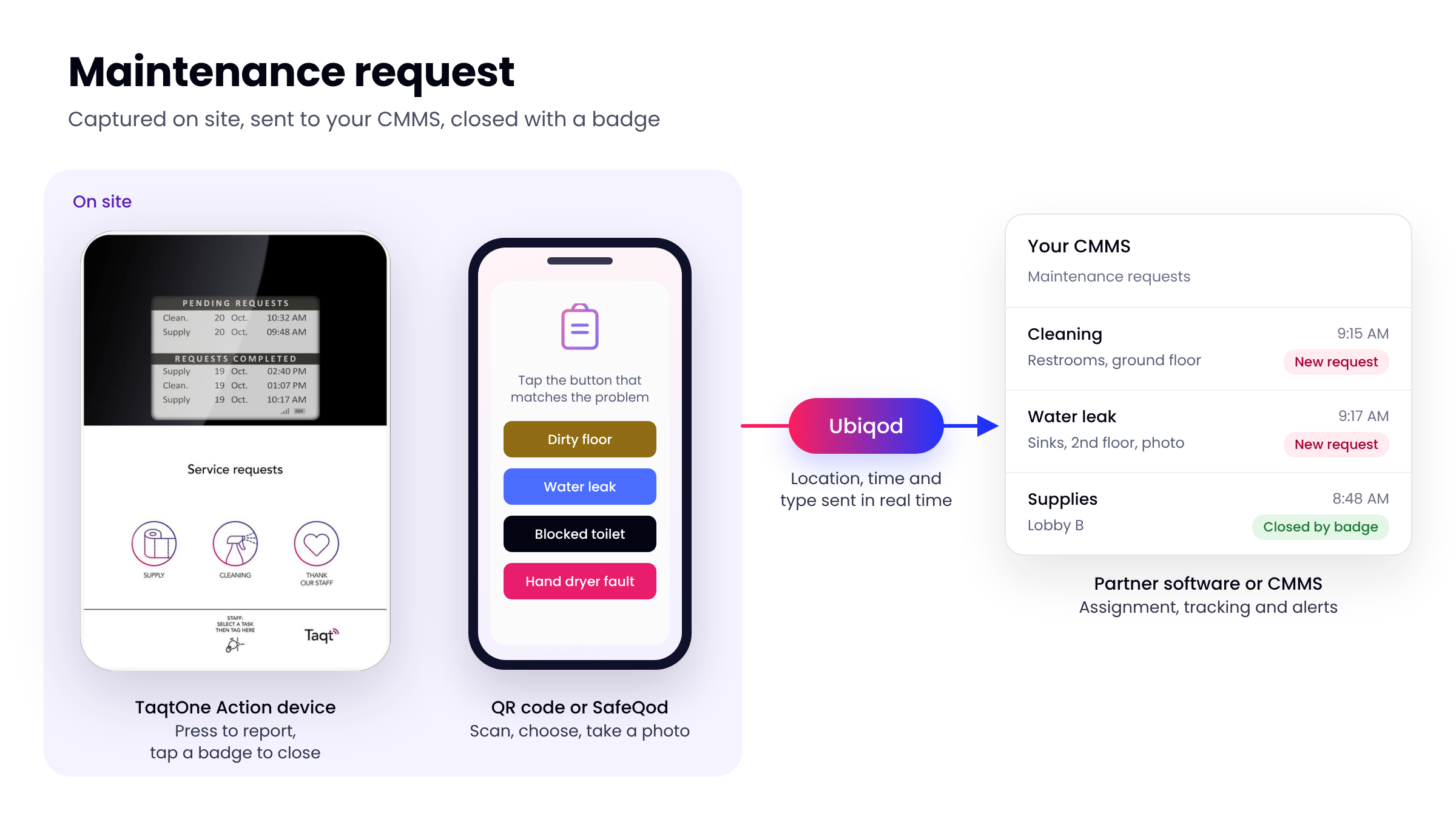
The simplest option is an Ubiqod QR code posted where it’s needed. Visitors scan it with their phone camera, with no app and no account. They pick the type of problem and can add a photo. Because the QR code is tied to a specific spot, the request arrives already located.
A printed QR code has a limit, though: once someone takes a photo of it, it works from anywhere, at any time. That opens the door to fake, malicious or simply playful requests, and to accidental ones, for example a page left open on a phone that resends a request hours later. A SafeQod secure QR code avoids this. Its code changes every 10 minutes by default, and Ubiqod limits the time between the scan and the form submission: to report a problem, you have to be in front of the code.
In high-traffic areas (restrooms, lobbies, meeting rooms), a device saves people from even taking out their phone. The TaqtOne Action device has a few buttons, each tied to a request type you name: supplies, cleaning, maintenance… One press sends a located, time-stamped request, and as with SafeQod, you have to be there. TaqtOne sticks to the wall with adhesive, without tools, in a few minutes. It runs on batteries (2 to 8 years depending on use) with its own cellular connection: no Wi-Fi, no cables. Touchless buttons are available as an option.
If needed, you can also restrict reporting to authorized staff: confirmation with a badge on the TaqtOne device, or with a PIN code on a QR code or SafeQod.
Field staff: report it on the way
Staff who spot a fault during their rounds report it the same way, identifying themselves with their badge on the TaqtOne device or a PIN code on the form, where they can also attach a photo. The request then shows who submitted it, which makes follow-up questions easier.
Negative feedback: satisfaction as a signal
A TaqtOne Smile smiley device doesn’t replace a maintenance request, but it raises the flag before the complaint. Votes are sent like any other data, and your software decides, based on its own rules, how many negative votes trigger an inspection visit.
From request to CMMS: what Ubiqod does, what your software does
Every request captured on site comes with four pieces of information: its type (the button or form used), its location (the spot and the site), its time and, for a form, an optional photo. Ubiqod sends this data to your tools in real time:
- by webhook, straight to your system (see the TaqtOne event integration guide);
- through connectors: Google Sheets, monday.com, Zapier, Make, Power Automate;
- to Taqt’s partner CMMS software.
Assignment, prioritization, contract deadlines and notifications (email, SMS, push) stay in your CMMS or partner software. Taqt doesn’t replace your CMMS: it feeds it with more requests, more precise and better located. If you don’t have a CMMS yet, Ubiqod’s View module lists requests (time, location, type, badge of the staff member who closed it) and exports them to CSV.
Closing the request on site
A request is only truly handled once the work has been done. With TaqtOne Action, staff close the request on the spot: they press the same button and tap their badge. The closing event shows who did the work and when, and your software can use it to close the work order automatically. The device screen shows the latest visits, so occupants can see someone came by.
Without a device, staff can prove their visit by scanning a SafeQod when they close the request: the scan is only accepted in front of the code.
The time between request and closure is then measured from events time-stamped on site, not from reports filled in after the fact.
Setting up on-site capture: six points to watch
- Clear, targeted categories. Three or four choices that make sense to visitors beat a long list.
- Easy to use. No app, no account: a button, or the phone camera.
- Automatic, reliable location. One QR code or device per area: the request arrives with the right location, without typing.
- Reliable reports. A code that expires (SafeQod) or a fixed device prevents remote submissions. A badge or PIN code restricts reporting to staff when needed.
- Requests kept separate from closures. Closure should identify the staff member, for example with their badge on the device.
- No added complexity. Requests land in the CMMS or tool you already use, where assignment and notification rules stay.
If you outsource cleaning or maintenance
If you manage a site whose cleaning or maintenance is outsourced (facility manager, property manager, customer experience lead), you can ask your contractor for:
- the history of requests by area and type;
- the time between each request and its closure;
- who closed each request;
- access to the data or a regular export.
These turn a feeling (“it takes forever”) into metrics you can review with your contractor.
Maintenance request system FAQ
Do people need an app to submit a work order request?
No. The QR code is scanned with the phone camera, and the TaqtOne Action device works with a single press.
Does the device need Wi-Fi or an outlet?
No. TaqtOne has its own low-power cellular connection and runs on batteries.
Can requests go into our current CMMS or maintenance ticket system?
Yes, by webhook, connector or partner software. It depends on what your CMMS accepts as input.
Who gets notified when a request comes in?
Your CMMS or partner software handles notifications and assignment.
What’s the difference with a service report?
The request flags the need before the work. The service report records it afterwards.
Is a printed QR code enough?
It works, but once photographed it can be used remotely, which invites fake and accidental requests. SafeQod or a TaqtOne device require being on site, and a badge or PIN code can also restrict reporting to staff.
Learn more about service requests with Taqt.