

Buddy Punching in Cleaning and Security: How to Stop It On Site

What is buddy punching?
Buddy punching is when one employee clocks in or out for a colleague who is late, absent or leaving early. The time record shows someone at work who is not there. It is one of the most common forms of time theft: being paid for hours that were not worked.
Buddy punching is a question of identity: who clocked in. Its twin question, where the clock-in happened, is covered in our guide to proof of presence.
Why buddy punching hits cleaning and security teams harder
In an office, a manager sees who walks in. Cleaning and security teams work differently:
- No supervisor on site. Cleaners and security officers often work alone or in small crews at client sites, early in the morning or at night.
- Many sites, short shifts. A supervisor cannot be everywhere, so the time record is often the only trace of who was there.
- Hours are billed to the client. A false clock-in is not only a payroll error: it ends up on an invoice, and it can cost you a contract if the client notices that a post was empty.
- Coverage matters. In security, an unmanned post is a risk in itself.
Signs of buddy punching in your time data
- several employees clocking in within the same minute, at the same place, day after day;
- clock-ins for different employees sent from the same phone;
- clock-ins that never vary by a minute, while the rest of the team’s do;
- a client complaining about work not done on a shift that shows as covered.
None of these is proof on its own. They tell you where to look.
What doesn’t stop buddy punching
- Paper sign-in sheets. Anyone can write a colleague’s name and time. See why paper timesheets cost more than you think.
- Shared PIN codes or time cards. A code or a card can be passed on with a text message.
- Printed QR codes. A photo of the code lets anyone scan it from home.
- GPS alone. A phone’s location can be faked, and it says nothing about who holds the phone. More in why employee GPS tracking fails on site.
- Biometric time clocks do tie the clock-in to a person, but they need power and network on every site, and collecting fingerprints or face scans comes with privacy obligations. Check what applies where you operate.
How to stop buddy punching on site
No single tool makes clock-in fraud impossible. What works is combining measures, so that cheating takes more effort than showing up.
1. A personal badge on a wall-mounted device
TaqtOne Time lets each employee clock in with a personal NFC badge. The device is wireless, fixed to the wall with adhesive and without tools, runs on batteries for 2 to 8 years depending on use, and has its own low-power cellular connection: no Wi-Fi, no cabling, no smartphone needed. Each clock-in comes from a device on a specific wall, so it proves that a badge was physically on site.
Let’s be honest, though: a badge can be lent. If one employee carries two badges, the device records both. A badge is a strong first layer, not the whole answer.

2. A rotating QR code scanned with the employee’s own phone
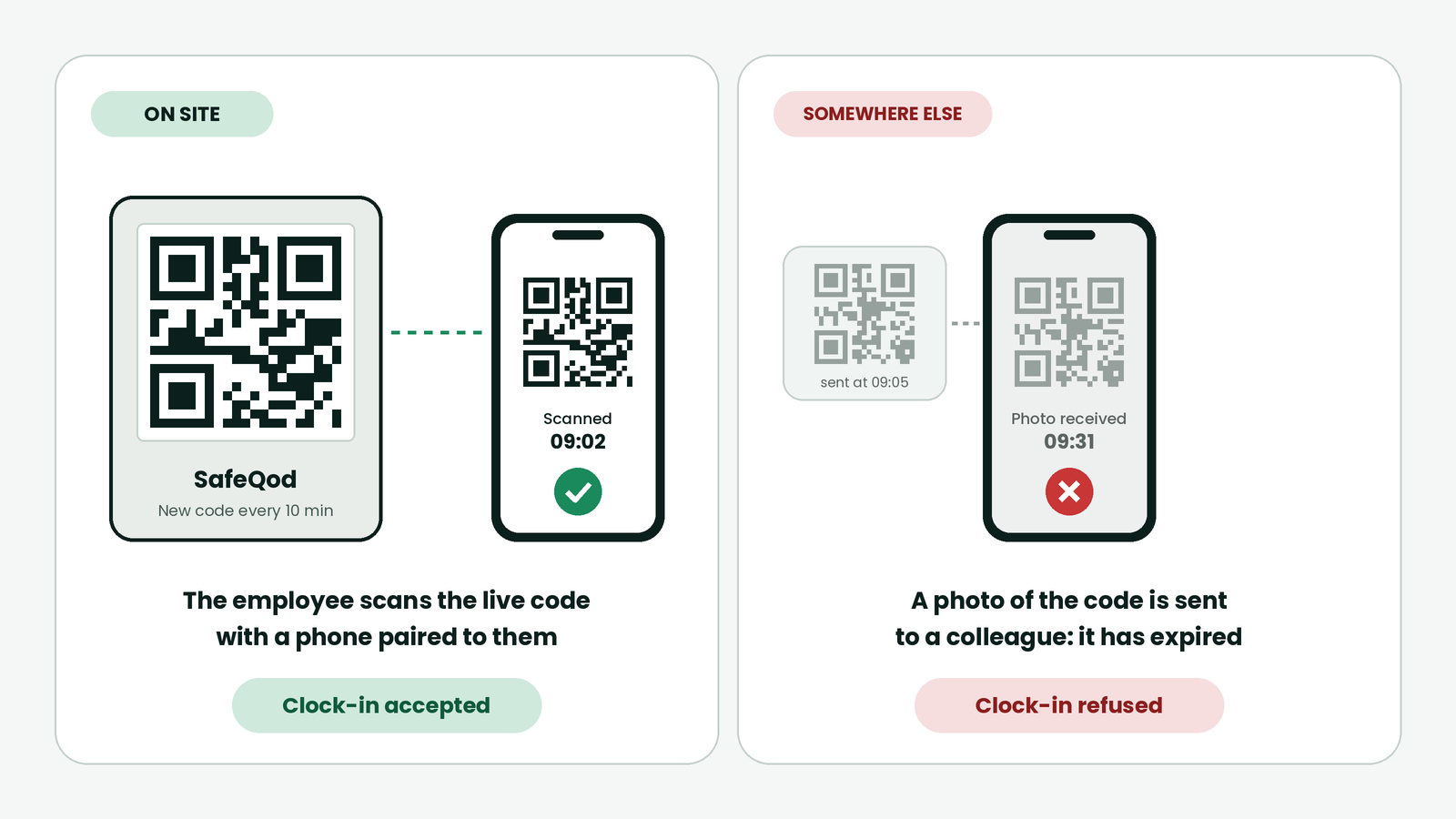
SafeQod displays a QR code that changes every 10 minutes by default, so a photo sent to a colleague expires before it is useful. Employees scan it with their phone camera, without an app. Three settings in Ubiqod close the remaining gaps:
- Phone-to-employee pairing: each phone is associated with one employee, so a colleague cannot clock in for someone else from their own phone. Turn it off if phones are shared.
- Time limit: the clock-in form must be sent within a set delay after the scan, so a code cannot be scanned now and used later.
- Random site photos: at random intervals, the employee is asked for a photo of the surroundings, which makes remote clock-ins hard to keep up.
SafeQod is waterproof and can be installed outdoors. Below 5 °C (41 °F), its e-paper screen pauses until the temperature rises again.
3. A kiosk for teams without phones
An Android phone in kiosk mode, fixed to the wall or held by a team leader, records clock-ins with personal PIN codes or QR badges. It runs on Wi-Fi. When a team leader holds it, someone sees who is actually clocking in.
4. Clean data, and the right people alerted
Every clock-in reaches Ubiqod, where you can follow it in real time in the View module or export it to CSV. Connector filters let you send only authenticated clock-ins to your payroll or scheduling software. If you want an alert when a shift has no clock-in, it is handled by your scheduling software or by one of our partner software solutions.
The human side
Tools work best with clear rules:
- write down that clocking in for someone else is not allowed, and what happens if it occurs;
- make clocking in quick: when it takes seconds, there is less reason to ask a colleague;
- deal with lateness openly, so that covering for a colleague is not the easy way out.
If you outsource cleaning or security
As a client, you pay for hours on site. You can ask your contractor for:
- clock-ins made on your premises and tied to a named employee, rather than a signed sheet;
- a regular export of clock-ins, to compare with the hours invoiced;
- a clear description of what prevents one employee from clocking in for another.
Buddy punching FAQ
Is an NFC badge enough to stop buddy punching?
No. It proves that a badge was on site, not who carried it. Combine it with a rotating QR code scanned from a phone paired to the employee, or with a kiosk held by a team leader.
Does GPS prevent buddy punching?
Not on its own. A phone’s location can be faked, and it does not prove who is holding the phone.
What is the difference between buddy punching and time theft?
Time theft covers any pay for time not worked, such as padded hours or personal tasks on the clock. Buddy punching is one form of it, where a colleague clocks in for someone else.
