Clocking-In Machine for Multi-Site Teams: How to Feed Your HR Software
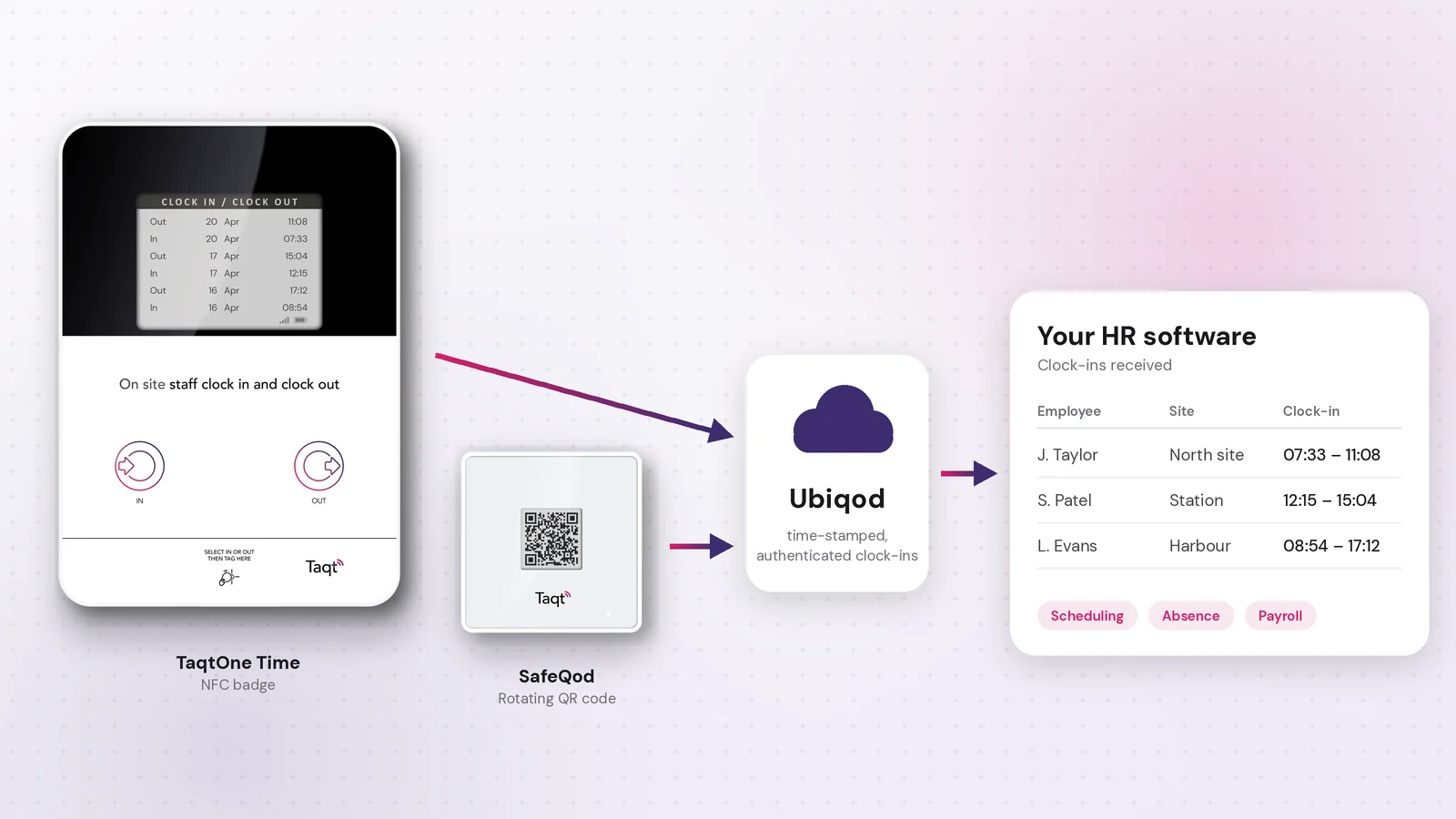
A clocking-in machine at the staff entrance works well when everyone starts at the same building. It works far less well when your cleaners, security officers or maintenance staff are spread across dozens of client sites, sometimes for a few hours a week each. Your HR software then receives declarations rather than clock-ins: times typed into an app, or copied from paper sheets.
This article does not compare HR software. It explains how to send it clock-ins made on site, and what to check so that it works.
What a clock-in should record
Each clock-in should carry five pieces of information:
- Who: the employee, identified by name.
- Where: the site, or even the exact area.
- When: start and finish times, time-stamped at the moment of clocking in.
- Proof: evidence that the clock-in was made on site, not remotely.
- Exceptions: a missed clock-out, a site where nobody clocked in.
Types of clocking-in systems
A fixed terminal
It works well on your own premises. On a client site, it needs mains power, a network connection and often some installation work: hard to justify for a few hours of service a week.
A mobile app with GPS
An app on the employee’s phone records who clocks in and when. For the location, it relies on the phone’s GPS, which can be spoofed and cannot tell one floor from another: it does not prove that the employee was on site. We explain why in why GPS tracking fails as proof of presence.
A printed QR code
Cheap and simple, and often enough for a small team built on trust. But once photographed, it lets anyone clock in from anywhere.
A wireless clocking-in machine
TaqtOne Time sticks to the wall with adhesive, with no tools, and is up and running in minutes. Staff clock in with their personal NFC badge, without a smartphone. It runs on batteries (2 to 8 years depending on use) with its own low-power cellular connection: no client Wi-Fi, no cables. Because it is fixed to a specific spot, each clock-in shows that the badge was on site.
A rotating QR code
If your staff have smartphones, SafeQod displays a QR code that changes every 10 minutes by default. Staff scan it with the phone camera, with no app to install. A photo of the code sent to a colleague soon expires: you have to be in front of it to clock in. Ubiqod can also link each phone to one employee and limit the time between the scan and the form submission. SafeQod is waterproof and works outdoors; below 5 °C, its e-paper screen pauses until the temperature rises.
A smartphone in kiosk mode
An Android phone fixed to the wall, or held by a supervisor, records the team’s clock-ins with a personal PIN code or QR badge. This mode works over Wi-Fi.
How clock-ins reach your HR software
Whatever the source, clock-ins arrive in Ubiqod, our cloud service, which forwards them in real time:
- By connector, to partner HR software: clock-ins arrive with no development on your side.
- By webhook, to any other software that can receive data.
Filters let you send only authenticated clock-ins to your software, for example those made with a personal badge.
No HR software yet, or need a simple backup view? View, Ubiqod’s visualisation module, shows clock-ins by site and by employee and exports them to CSV. It is not HR software: no scheduling, absence management or payroll, just a clear view of who was where, and when.
Who does what
- Taqt records the clock-in on site, time-stamps it, identifies the employee and shows it was made on site.
- Ubiqod forwards clock-ins to your tools.
- Your HR software handles scheduling, compares planned and actual hours, manages absence, sends alerts and prepares payroll.
HR software already connected to Taqt
Several HR software providers already receive Taqt clock-ins, with no development on your side. For example:
- Timesquare by Holy-Dis imports clock-ins from TaqtOne devices and SafeQod to compare planned and actual hours.
- Lucca uses Taqt to record start times on sites without Wi-Fi or a power socket.
- Skello, HR software for frontline teams, is also listed among our HR partners.
Already a customer of one of them, or looking for HR software? Contact the provider directly: they will tell you how to switch on Taqt clock-ins in their tool.
Five questions to ask your HR software provider
- Does your software accept clock-ins from another system, by connector, API or webhook?
- How does it match a clock-in to an employee: badge ID, payroll number, email address?
- Does it compare planned and actual hours automatically, site by site?
- How does it flag exceptions: missed clock-out, site with no clock-in, late start?
- Does it handle multiple sites, with staff moving between several sites in a day?
If you outsource cleaning or security
As a client, you pay for hours of presence on your premises. You can ask your contractor for clock-ins made on your site and linked to a named person, rather than a signed sheet, and for a regular export of hours on site to compare with the hours invoiced. Our guide to proof of presence explains what you can ask for.
FAQ
Is Taqt a clocking-in system?
Taqt provides the clocking-in machines and the cloud service that record clock-ins on site. Calculating hours, scheduling and payroll stay in your HR software.
Do I need the client’s Wi-Fi?
Not with TaqtOne, which has its own cellular connection, nor with SafeQod, which is scanned by the employee’s phone. Kiosk mode works over Wi-Fi.
Does it work outdoors?
SafeQod is waterproof and can be installed outdoors. Below 5 °C, its screen pauses until the temperature rises.
My HR software is not in the partner list. Can I still connect it?
Yes, if it can receive data by webhook or through an automation tool such as Zapier, Make or Power Automate.
Who sends alerts when something goes wrong?
Your HR or partner software, based on its own rules. Ubiqod sends it the clock-ins.
I make HR software. How can I receive Taqt clock-ins?
Ubiqod forwards data from TaqtOne devices, SafeQod and QR codes in real time by webhook. Contact us to join our partners.
The simplest way to get reliable clock-ins from your sites is through your HR software: choose a provider already connected to Taqt and get in touch.