

Portable Time Clock: Clocking In on Sites Without Wi-Fi or Power
A security officer starting a shift at a gatehouse. A cleaning crew covering three buildings before noon. A construction foreman whose job trailer moves as the project moves. None of them can count on an outlet or a Wi-Fi network, and all of them need to clock in. Most portable time clocks solve the first problem: they run on batteries or on the employee’s phone. Few answer the question your payroll team and your clients actually ask: did the clock-in happen on the right site?
What is a portable time clock?
A portable time clock records when employees start and end their shifts away from a fixed office. It is either a device you can move from site to site, or the employee’s own smartphone used as a time clock.
You will also see the terms job site time clock, mobile time clock, battery-operated time clock and cellular time clock. The two meanings work best together: a device placed on site, and the employee’s phone to clock in on it.
The real problem: proving where the clock-in happened
- An app on its own records what the employee declares. The time is reliable; the place much less so.
- Phone GPS can’t tell floors apart and can be faked with apps from the app stores. See why employee GPS tracking fails on site.
- A printed QR code is cheap and simple, and in a small team built on trust it may be all you need. But a photo of it lets anyone clock in from anywhere.
- A shared PIN or badge proves that someone knew the code, not who was there. That is the buddy punching problem.
For a portable time clock to prove presence, it needs something installed on site that is hard to get around remotely, and that moves as easily as the crew.
What to check before you buy
- Power: does it need an outlet, a charger, or batteries that last for years?
- Connectivity: does it rely on the site’s Wi-Fi, its own cellular connection, or the employee’s phone?
- Installation: can it go up without drilling, and come down when the job ends?
- Weather: can it be installed outdoors, and what happens in the cold?
- Proof of presence: can a clock-in be faked from home, or by a colleague?
- Data: can clock-ins reach your payroll or scheduling software without retyping?
Four situations, four answers
A crew that covers several sites in a day
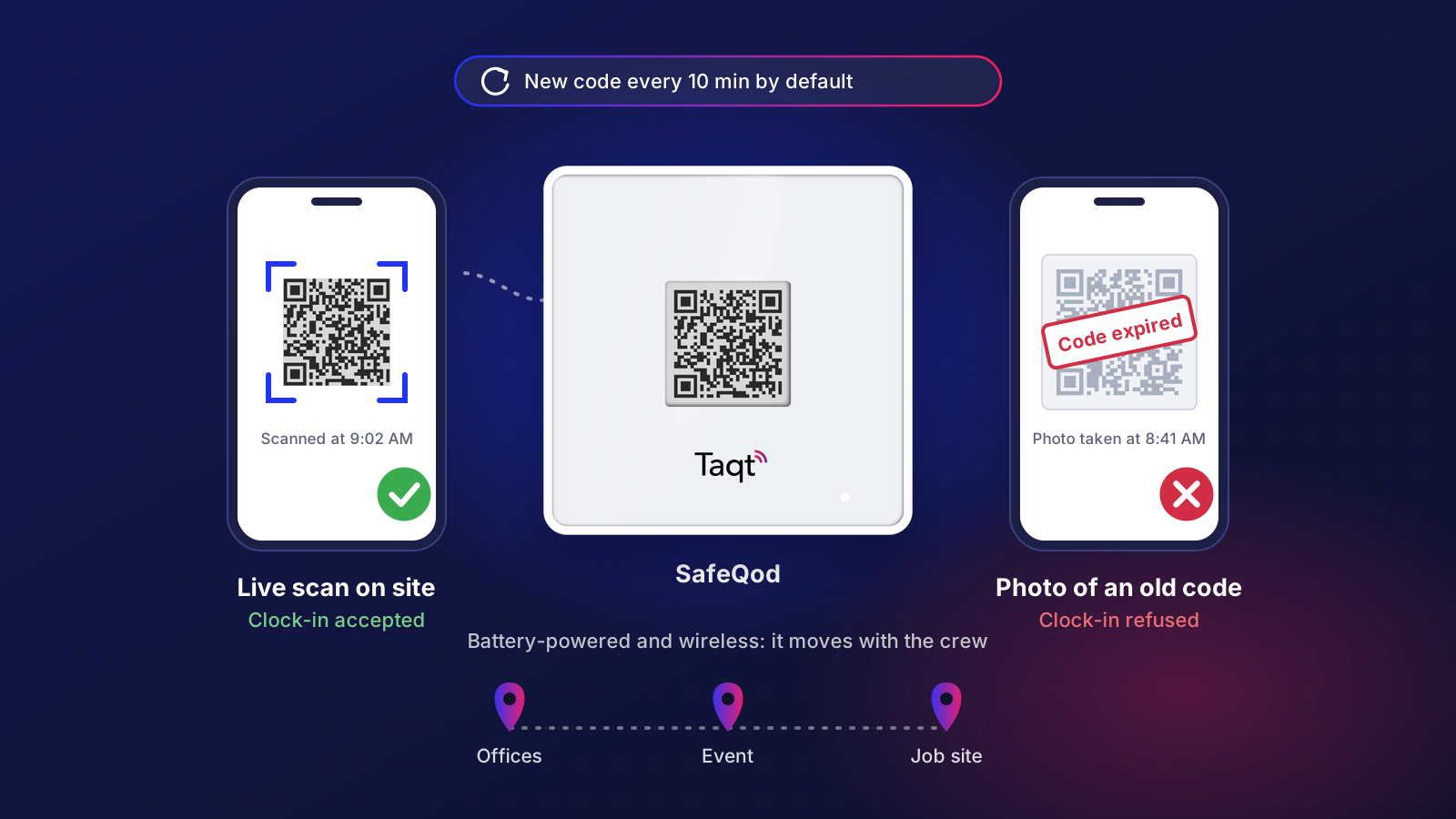
On each site, a SafeQod rotating QR code displays a code that changes every 10 minutes by default. Employees scan it with their phone camera, with no dedicated app to install, on arrival and on departure. A photo of the code only works for a few minutes: once the code has changed, it no longer clocks anyone in. To use it in time, a colleague on site would have to send it right away, which takes real coordination.
Three Ubiqod settings shrink that window further:
- a time limit between the scan and the form submission, so nobody clocks in after the fact;
- phone-to-employee pairing: clocking in for someone else would take their personal phone. Turn it off if phones are shared;
- on sensitive sites, a photo of the surroundings requested at random intervals, which can’t be taken without being there.
For lower-risk sites, an NFC tag read by the phone is another option, harder to copy than a printed QR code.
A temporary site: an event, a short contract, a job trailer
SafeQod runs on batteries and is wireless: it goes up without an outlet or any wiring, and leaves with the crew when the job ends. In Ubiqod, assigning a SafeQod to a site is optional. When you move it, update that assignment if you track clock-ins by site, which is usually the case.
For temps or extra staff, a personal PIN code or QR badge identifies them without a dedicated app to install.
A crew without smartphones
A team leader holds an Android phone in kiosk mode. Each employee clocks in with a personal PIN code or QR badge. The same phone can also be mounted on a wall. Kiosk mode runs on Wi-Fi.
A fixed site with no Wi-Fi
When the crew comes back to the same site every week, a device that stays on the wall is simpler. TaqtOne Time is a cellular, battery-operated time clock. It sticks to the wall with adhesive, without tools, and runs on AA batteries for 2 to 8 years depending on use. It has its own low-power cellular connection: no Wi-Fi, no outlet, and no smartphone for the employee, who taps a personal NFC badge on it.
Security guard time clocks
Security posts add two constraints: officers often work alone, and an empty post is a risk in itself. A SafeQod at the post lets each officer clock in with their own phone, paired to their name, within a set time after the scan. At a fixed post without Wi-Fi, a TaqtOne Time with personal NFC badges works without any phone. For the identity side, meaning who actually clocked in, see our guide to stopping buddy punching.
Job site time clocks
On a construction site, the constraints pile up: outdoor work, no reliable power, a job trailer that moves as the project advances, and crews that change with each trade.
SafeQod is waterproof and can be installed outdoors, for example at the trailer door. Below 41 °F (5 °C), its e-paper screen pauses until the temperature rises again. When the trailer moves, the SafeQod goes with it: update its site in Ubiqod if you track clock-ins by location.
If the trailer has Wi-Fi, kiosk mode also lets the foreman clock in workers who don’t have a smartphone.
Portable time clock options compared
- Plug-in time clock: reliable at a building entrance, but it needs power and a network on every site.
- Rugged portable terminal: built to travel, but it has to be charged, and a cellular model comes with its own data plan.
- App with GPS: nothing to install on site, but the location relies on a position that can be faked.
- Printed QR code: available in Ubiqod and low-cost, often enough for a small team built on trust. Its limit: a photo lets people clock in remotely.
- NFC tag read by phone: harder to copy than a printed QR code, but it needs an NFC-capable phone.
- NFC badge on a wall device (TaqtOne Time): no smartphone needed and its own cellular connection, but it stays on a fixed site. Like any RFID time clock, it proves the badge was there, not who carried it.
- SafeQod rotating QR code: the code expires, so a photo of it only works for a few minutes. With Ubiqod’s settings, clocking in remotely becomes very hard. It moves with the crew and is scanned with no dedicated app.
- Kiosk mode: one phone for the whole crew. The proof rests on the team leader who holds it, or on where it is mounted.
Where the clock-ins go
Whatever the method, every clock-in reaches Ubiqod. You can follow arrivals and departures site by site in the View module, export them to CSV, or send them to Google Sheets, monday.com, Zapier, Make, Power Automate, or your payroll and scheduling software. Connector filters let you forward only authenticated clock-ins.
Alerts, for example when nobody clocked in at a scheduled site, are handled by one of our partner software solutions.
A word on privacy
Biometric time clocks (fingerprint, face) and photos of employees at each clock-in come with privacy obligations: check what applies where you operate. A badge, a personal code or a QR code collects no biometric data. A photo of the surroundings, without the person, is an alternative.
If you outsource cleaning or security
When your contractor rotates staff across your sites, you can ask for:
- a clock-in on each site, not one sheet per route;
- something on each site that makes remote clock-ins very hard, not just an app with GPS;
- a regular export of attendance by site.
Some Taqt partner software automatically compares these clock-ins with the visits in your contract. Read more about proof of presence on site.
Portable time clock FAQ
Does a portable time clock need Wi-Fi?
Not necessarily. With SafeQod, the clock-in goes through the employee’s phone, which needs a data connection to open the clock-in page. TaqtOne Time has its own cellular connection and needs neither Wi-Fi nor the employee’s phone.
Can employees clock in with their personal phone?
Yes. Scanning a SafeQod uses the phone camera, with no dedicated app to install. If you pair phones with employees, turn the option off for shared phones.
What is a cellular time clock?
A time clock that sends clock-ins over the mobile network instead of the site’s Wi-Fi or a cable. TaqtOne Time uses a low-power cellular connection and runs on batteries, so it can go on any wall.
Is there a battery-operated time clock that doesn’t need an outlet?
Yes: TaqtOne Time and SafeQod both run on batteries. TaqtOne Time lasts 2 to 8 years depending on use.
How do I clock in a crew without phones?
There are two ways. A team leader carries an Android phone in kiosk mode from site to site, and employees clock in on it with their PIN code or QR badge. On a site the crew visits every week, a TaqtOne device on the wall lets them clock in with an NFC badge.
